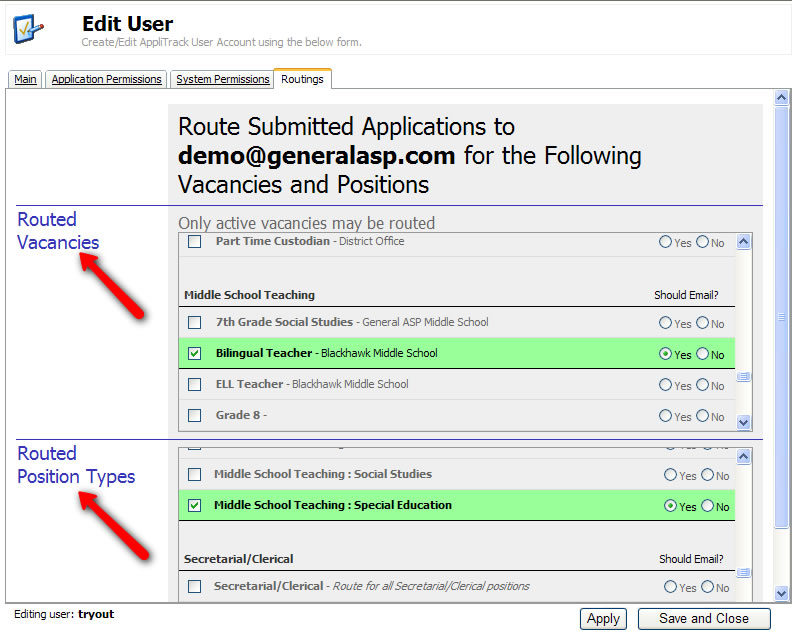
Edit a User's Routings
You can modify a user's (principal,
administrator, etc.) routings to set which postings or job types will generate
email to the user.
Concept: Routing
In AppliTrack, a Routing is a way of telling the system that the user has particular interest in a specific job posting, or a pool of candidates for a position type. Routings make it easy for users to quickly view all new applicants for a given area and, optionally, be notified by email whenever a new application is submitted.
Here's how:
1) Click the Users tab. You need to have the
"Can Control Users" permission in order to do this.

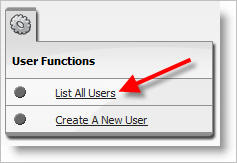
2) Click on List All Users.
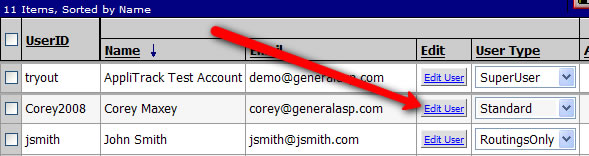
3) Click on the Edit User link in the Edit column for the user you would like to modify.
4) Click the Routings tab and change which position(s) they can see. Note that Routings can be established on vacancies (job postings) or position types. Once a vacancy is deactivated, all routings for that vacancy are disabled. It is aslo possible to assign routings at the time that a job posting is created.